Week twelve and thirteen - Materials, modelling and 1st pass cinematic
- bs266757
- Dec 21, 2022
- 3 min read
Near the end of week 12 I had a soft deadline in which I needed to another material and lighting pass and a 1st pass for my cinematic. I wanted to get some important models and textures into the room before working on my cinematic so started the week working on those. I worked on modelling things like the big windows curtains and going through modelling things or placing things for some of the side tables. I also worked on another texture pass in which I edited the kitchen bricks to have a better colour match to my reference and a better size also. I also colour matched the purple and blue paints better.


For example, I used substance designer to create the patterned wood flooring. This was one of the first designer textures I didn't follow a tutorial for, I just took what I had learnt from the many wood based tutorials I had watched and applied it to this texture. Since this is quite an interesting patterned wood floor I decided to digitally draw the pattern with a base colour (on the app procreate for the iPad). I then imported the saved file of the design into substance designer as a bitmap and managed to blend it with a wood texture and adjust things like the colours and the roughness, etc. I was really happy with how this turned out and will be using this technique again.

I used a similar technique with the main rug. I couldn't find a clear image of the rug I could've used as a texture so decided to make on myself. I had heard about using the app procreate to draw textures over UVs so they fit together so decided to try this technique. I UVed the rug and imported the image of the UV shape onto my iPad and into procreate. I then drew a simplified version of the rugs design over the top of the UV. I then used the same techqiue i did for the floor pattern and imported the design in as a bit map, added a noise texture to simulate a rug/carpet texture and then created the unreal material. Since I drew directly over the UV it fit perfectly.
Before starting work on my cinematic in the sequencer I just took some screen shots of specific shots or items I wanted to include, I numbered them and annotated what idea I had for them.
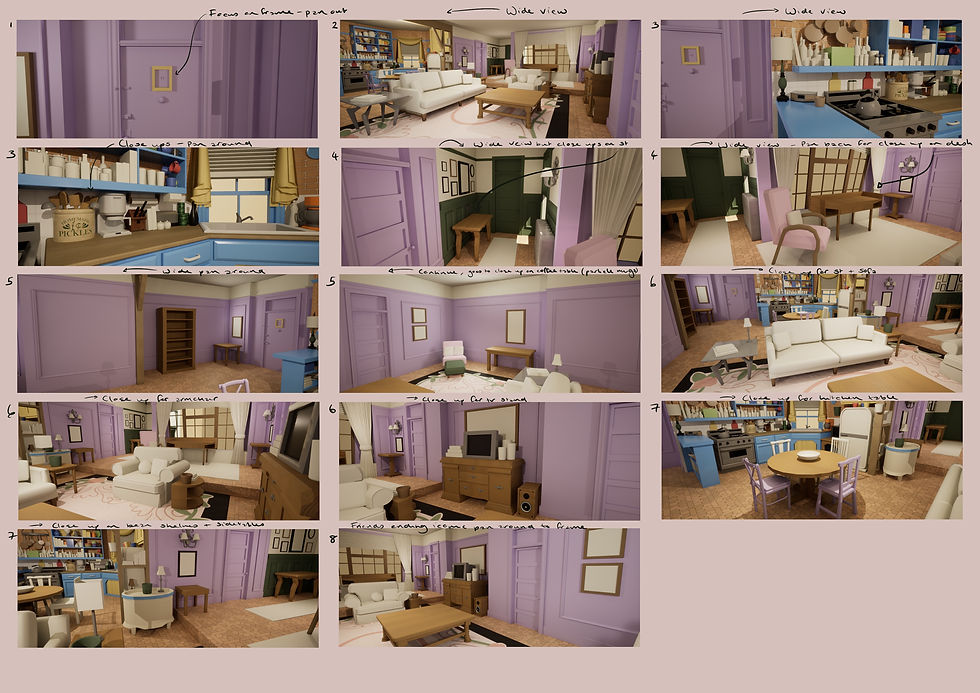
I started working through this plan but I didn't like how it was going, I think the ideas I had for my shots were too long and vague and that I needed shorter shots with more specific items in focus that are important or done well. I still used the basic time line of my story board and also kept a few of the shots that did work well or had a good idea behind them. For example, I wanted to finish my cinematic with the same camera shot that finished the 'Friends' series, the final ever shot was a pan of the room which ended on the iconic yellow frame on the door so I decided to replicate this as my ending. I originally had some issues with sequencer and felt like I needed a refresh on how to use it effectively so used a YouTube video for some helpful tips. One of the tips I found most useful was splitting the screen in two, one to preview the cinematic view and the other to move the camera in the scene, but in general his tutorial was very helpful.
I knew I eventually wanted some audio for my cinematic and originally I had wanted the original theme song in the friends intro. After looking at it the original theme was only 43 seconds but I needed it to fit my minute long video, I didn't want to cut it badly because I specifically wanted the fade out ending and classic intro so I outsourced a cover of the song from my brother. I think it fits the cinematic really well and adds alot of life to the video. Below is the first pass of the cinematic.
Working through my Trello has been a bit of a slow process this week as I've found I have alot of small things to work through for things like the side tables for example. However I still think its a great aide and is helping me keep organised.


I am currently worried about time I have left so will be focusing next week and the week after on getting the rest of the important models in and then UVing and texturing what I have. I also really want to add some particle work in engine so that's a goal of mine too. If I have time after these things then I will be going back to add in more details and more intricate textures and edits to models.


Comments